

AI saves me 10h weekly as a CTO
How I built my Q&A agent.

This is “Effective Delivery” — a bi-weekly newsletter from The Software House about improving software delivery through smarter IT team organization.
It was created by our senior technologists who’ve seen how strategic team management raises delivery performance by 20-40%.

TL;DR
I used up to 10 weekly to answer questions about our projects,
AI could do it for me as long as it had access to the right knowledge,
We used AI to collect project knowledge and answer questions about it,
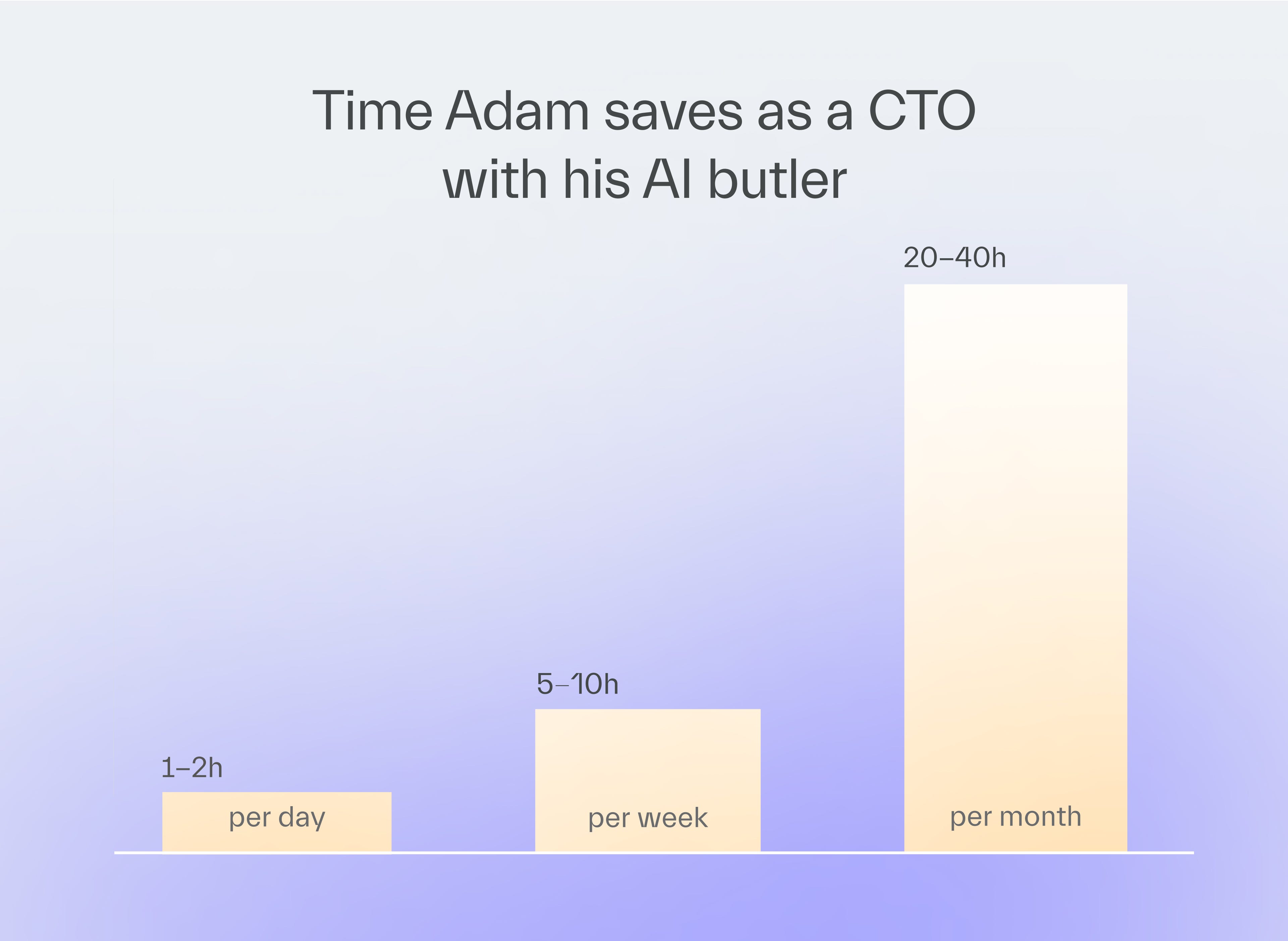
My AI butler saves me 1-2 hours a day and others report time saved as well.
Contents
2. The AI’s structure & workflows
3. Plans for V2
Hey! Adam here.
As a CTO, I get a ton of project questions from my teammates.
It’s my job to help them.
But freeing myself from the easiest 80% of questions thanks to my new AI chatbot allowed me to focus on the challenging ones.
Why I built my AI butler
Project questions come from 3 types of people.
Sales
They look for projects that match a new client’s domain, technology stack, or region so they can build a proposal
Marketing
They search for project details for use in content such as case studies, landing pages, or a dedicated offering for a potential client
Engineering managers
They may want to find out which project used a given framework or approach, so that they can ask the person who implemented it for advice
But I am just one person.
I don’t always have the time for every request.
I thought I could make mine and their lives easier with AI.
At this point, I didn’t know whether the idea would succeed, so I wanted a quick, easy MVP to validate it.
My plan had 3 steps.
Give EMs a way to assemble key knowledge from any project quickly,
Set up an AI chat that answers questions based on that knowledge,
Give everyone (who needs it) access to it via a custom chat.
The AI’s structure & workflows
Structure
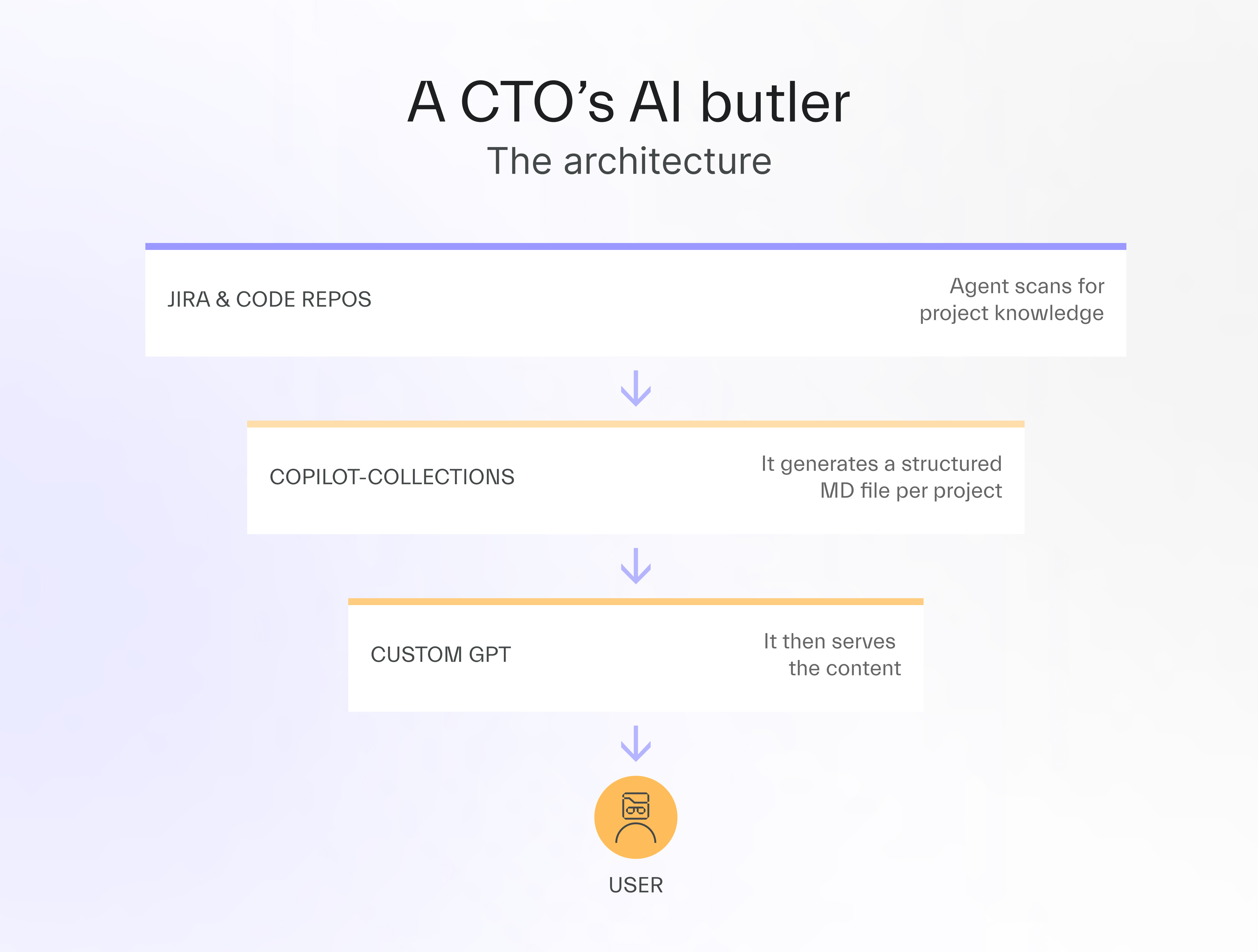
My AI butler is based on 2 key elements.
1. copilot-collections
This is TSH’s own AI development framework built on top of GitHub Copilot.
It includes 1 agent relevant to the AI assistant — the knowledge-building agent.
2. Custom GPT
It’s a custom version of ChatGPT.
The tool is configured with a system prompt that defines its role as a project-matching agent.
It currently uses the GPT‑5.4 Thinking model.
Workflows
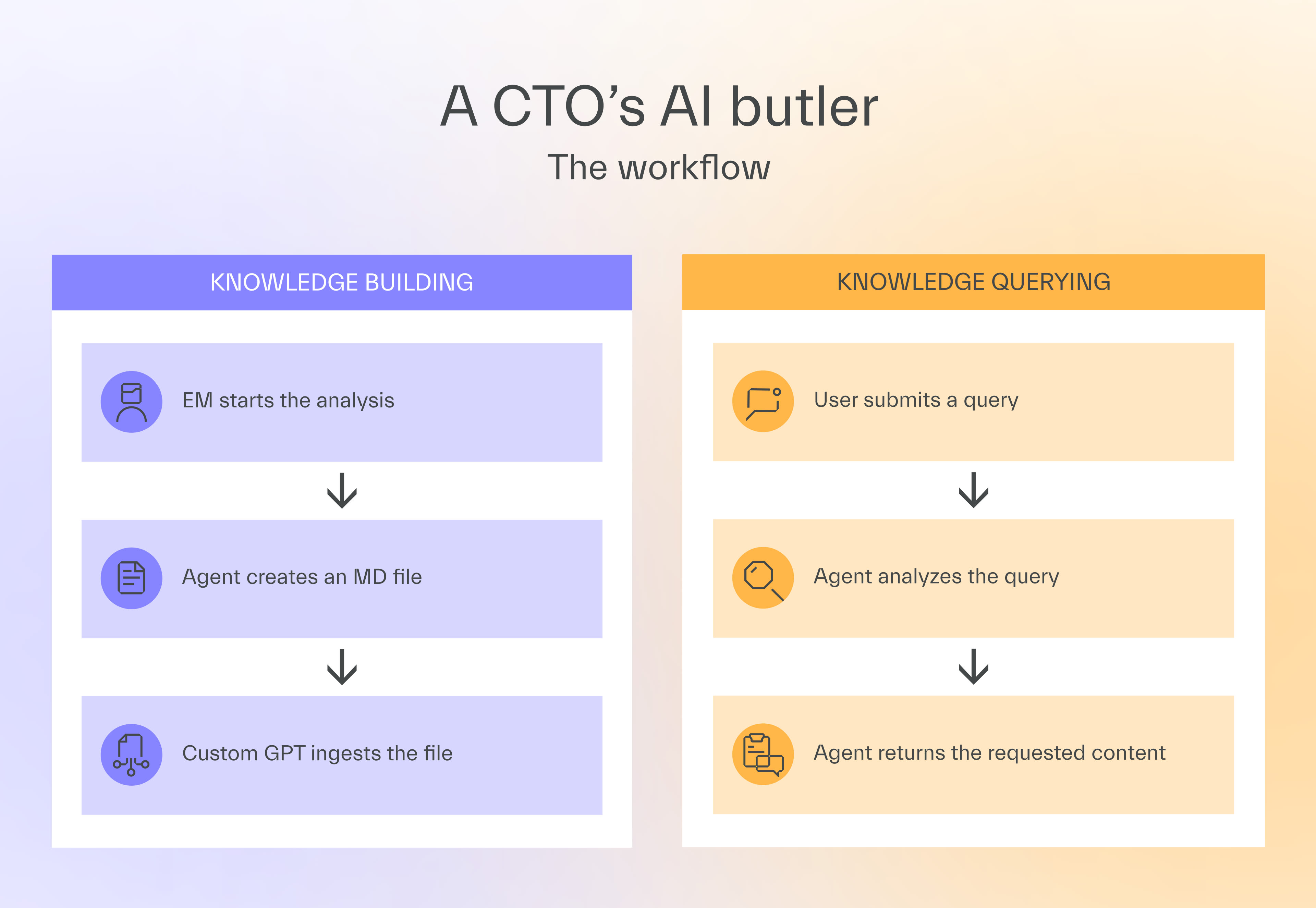
The system has 2 distinct workflows: knowledge building and knowledge querying.
1. Knowledge building
The knowledge-building workflow runs in 3 steps.
The EM starts copilot-collections to analyze project knowledge,
An agent generates a standardized markdown file,
The custom GPT chat gets the file and learns about the project.
It’s worth mentioning that we classify each project made for the same client separately, as each may use different technologies, libraries, concepts, and approaches.
The IT team built 3 separate applications for one specific client.
The AI project assistant considers each as an independent project with its own separate space in the markdown file.
2. Knowledge querying
For users other than EMs, this is the only important workflow.
A user with access to the AI project assistant enters a query in it,
The assistant goes through all the files it has, which are classified by region (each file having many different projects from the same region),
The assistant returns the answer, which may be a list of fintech projects or a list of projects that involve developing an export-to-PDF functionality.
A salesperson had to identify all TSH projects with fintech experience.
The chat returned a full list without requiring any search across company systems.
Plans for V2
Using my AI chat assistant saves me 1 to 2 hours every working day or 20-40 hours a month.
It also helps people who would not have reached out to me in the first place, so the total time saved across the organization is even greater.
The current version has 3 limitations worth knowing before you build your own.
You can’t upload more than 20 files at once, which forced us to group project knowledge by region, potentially reducing precision,
There is no shared search history, so 2 salespeople can run identical queries without either knowing,
We need to pay a $20 per-user license fee for each ChatGPT account, regardless of how often each person uses it.
Given how successful the project is, I already have a more advanced version in the works.
It will likely be a custom application built on OpenAI’s visual Agent Builder.
It will connect additional data sources such as Confluence, track usage per user, and use token-based pricing rather than a per-user monthly subscription.
Don’t jump straight to the complex version, though.
Each organization is different, and there’s no telling if an app exactly like this is good for you.
My recommendation is to build the simple version first, test it for a few weeks, and commit to a more advanced build only if the results justify it, as in my case.

Next time
Effective Delivery #22 will cover my observations on why some engineers use AI coding tools 200% more efficiently in a real project than others.
Perhaps it’s not just a natural talent, and there’s a way to learn it?
Stay tuned and find out.
Thanks for reading today ✌️

🫵🏽 I know you haven’t read this yet



Published with a smirk by The Software House
Twarda 18, Warsaw, Poland
tsh.io →
 | A guest post by
|