


This is “Effective Delivery” — a bi-weekly newsletter from The Software House about improving software delivery through smarter IT team organization.
It was created by our senior technologists who’ve seen how strategic team management raises delivery performance by 20-40%.
🔔 +121 subscribers in February! We appreciate you! Thank you for your trust.

TL;DR
Individual departments struggle to collaborate on AI PoCs,
Managers discover flaws in their AI plans too late,
A 12-item checklist helps assess AI readiness,
Find out what you lack to minimize the risk of failure.
Contents
Hello! Aleksander Patschek at your service.
I am a Solution Architect at The Software House.
According to MIT’s 2025 report, 95% of gen AI pilots fail to deliver ROI.
Technology is not the problem.
Companies simply start software projects beyond what they can afford.
The mistake executives make is believing that building AI features looks exactly the same as regular development features.
I’ve co-launched 11 AI PoCs, and I’m here to warn you that they’re not the same.
I designed a checklist to help you identify flaws in your AI preparation before you invest.
Why AI PoCs fail
A non-AI feature often requires only your IT team.
An AI feature often calls for coordination across departments that rarely work together.
Legal must determine what data can be sent to AI providers,
Data teams must ensure information is clean and accessible,
Governance must create rules for AI usage,
IT must implement the solution.
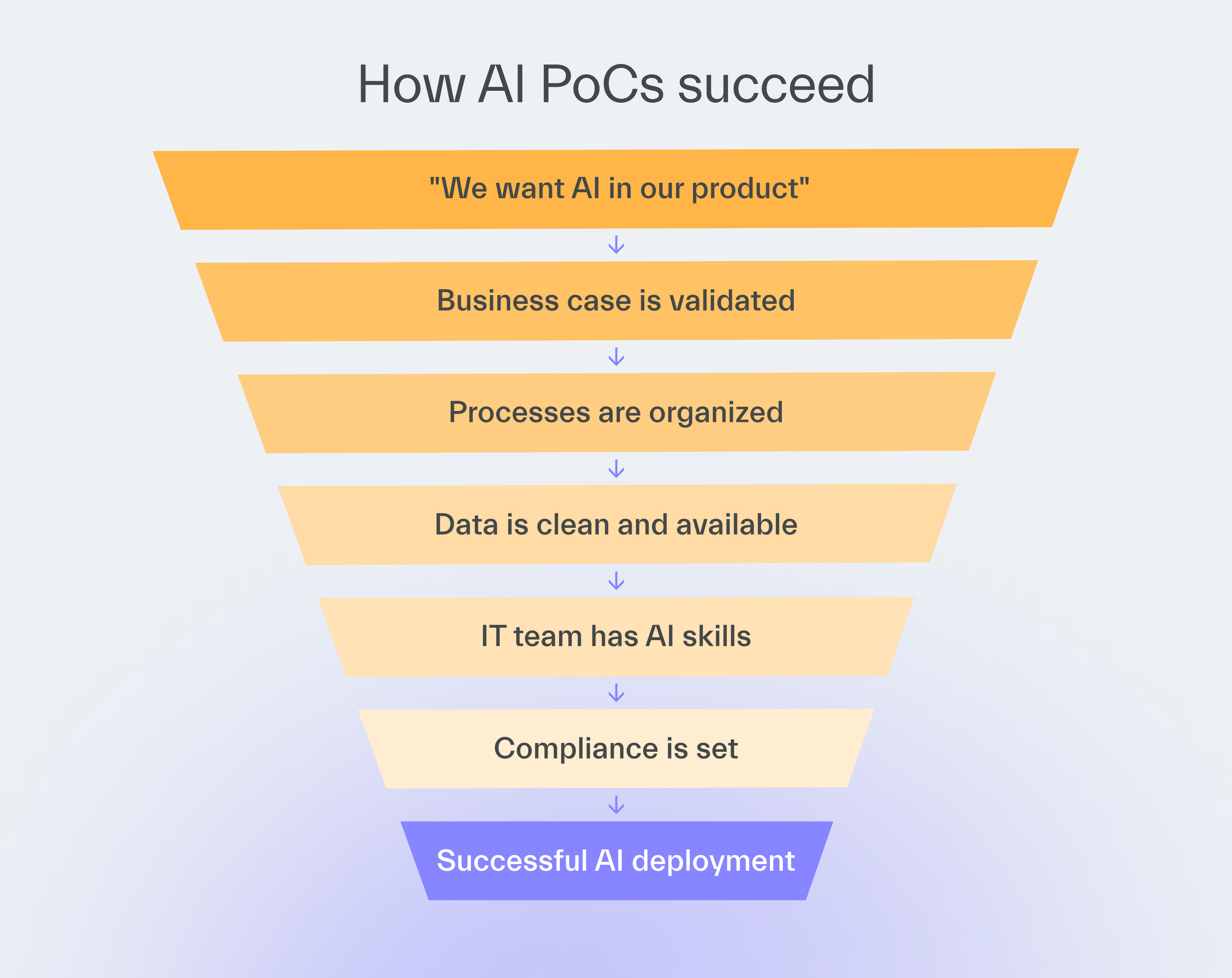
If any department is not ready, the project may fail.
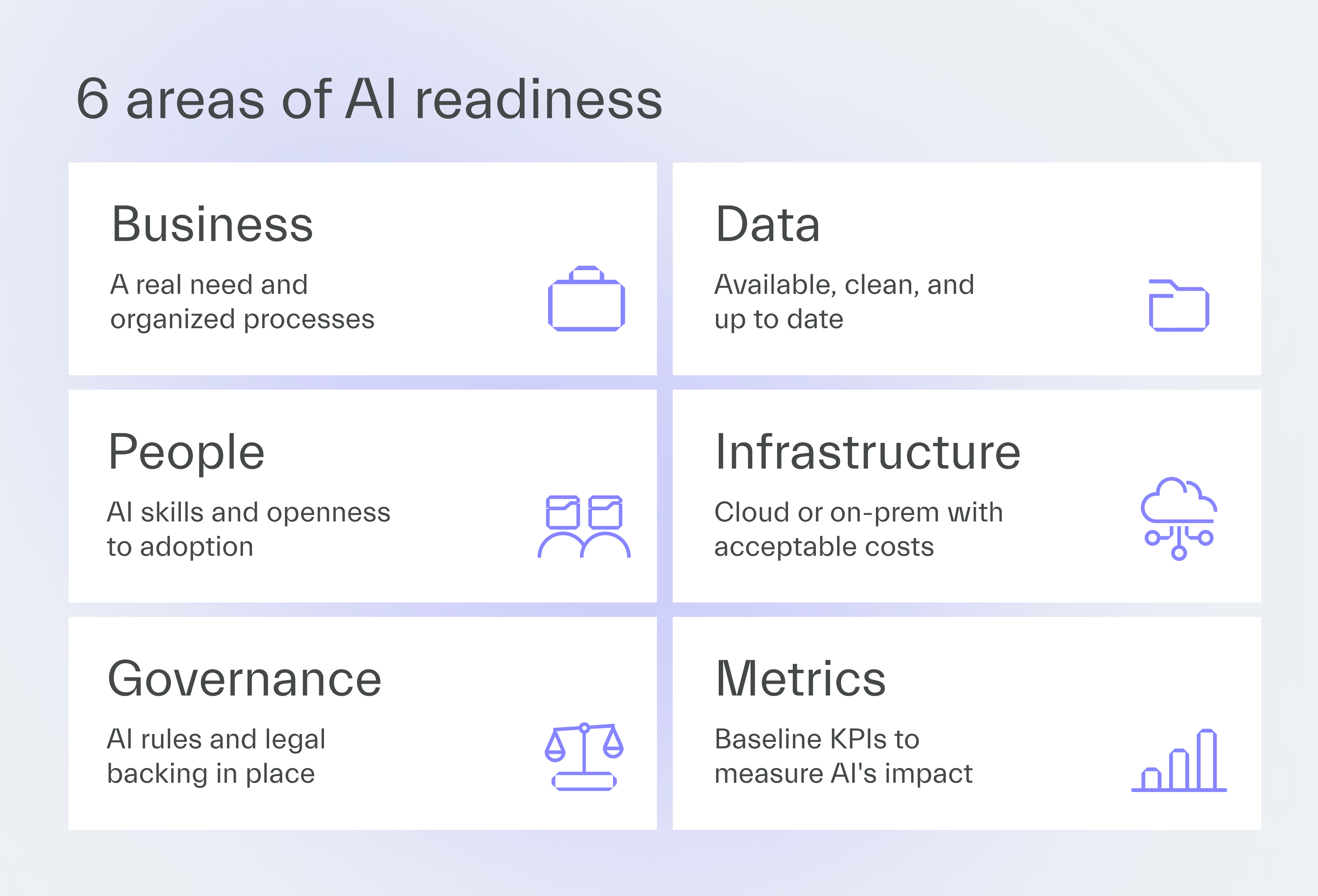
The AI readiness checklist
In my experience, successful AI pilots start from an audit of internal AI capabilities.
Unfortunately, many managers rush their projects, skipping the audit or missing key areas.
My checklist covers all the essential areas while remaining short and sweet.
Find out if the AI initiative you have in mind is likely to succeed or something to give up on now, before it wastes time and money.
Business
1. Our AI initiative solves a real user need
There’s evidence that users are tired of AI features.
Just one report suggests 35% of users don’t want AI on their devices (Circana, 2026).
Ask users whether they need AI and where it could improve their work.
You can use methods such as:
user interviews,
surveys,
data analysis.
Many AI success stories come from relatively simple use cases, such as document processing.
Such projects focus on automating processes that users or employees find tedious.
2. Our internal processes are well-organized
AI can speed up a process only if it’s well-organized to begin with.
Processes that involve a lot of repetition are AI-friendly, while multiple exceptions and edge cases make it hard for AI to account for different scenarios.
Talk to the people actually doing the work to understand how the process functions, not just how it looks on paper.
Data
3. The data required for the AI initiative exists
Features like document processing often require minimal historical data, as AI mostly works with incoming documents.
But if you receive invoices in unusual formats, you need historical examples to train the AI to extract information.
Similarly, chatbots often require huge amounts of data because AI must accurately answer company-specific questions.
Ensure you have the data that fits your needs.
4. There is sufficient data
The chatbot example shows that sometimes you not only have to ensure that the data you need exists, but also that there’s enough of it.
At other times, you may find that the data you seek is potentially available, but extra effort is required to obtain it.
For example, if the process knowledge you seek exists only in employees’ heads, document it.
5. The data is clean and actual
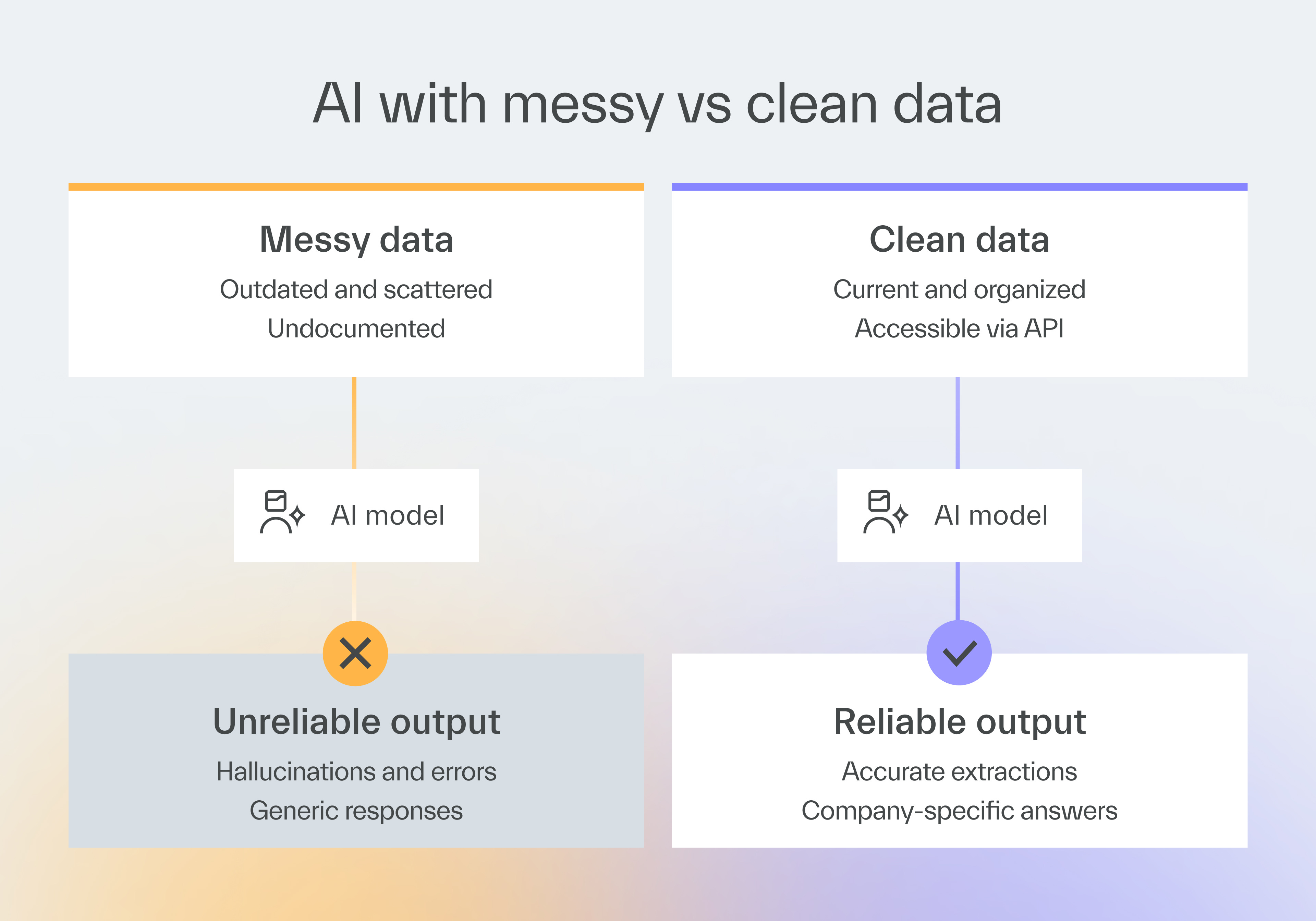
Out-of-date data will make AI provide outdated answers.
Data must also be organized and accessible, ideally in a single location, such as a data warehouse.
If your data is scattered across systems, organize it before starting AI development.
Human resources
6. Engineers know how to use AI
Implementing AI requires specialized knowledge that goes beyond basic prompting.
Your engineers may need to work with vector databases and perform retrieval-augmented generation or agentic orchestration.
Fine-tuning models often requires machine learning experts rather than regular backend developers.
If AI development is a one-time project, partnering with an experienced software company may cost less than upskilling or hiring.
Your developers may also acquire expertise from working with them.
7. Employees have a positive attitude towards AI
People sometimes fear AI will replace them, so they resist adoption.
Remind them that AI can’t automate all of their work.
Instead, it will speed up a lot of it, making their lives easier and improving their productivity.
As such, they are much better off using it to the fullest.
If they don’t, another human willing to use new tools will take their job instead of AI.
Infrastructure
8. The AI POC can use the cloud
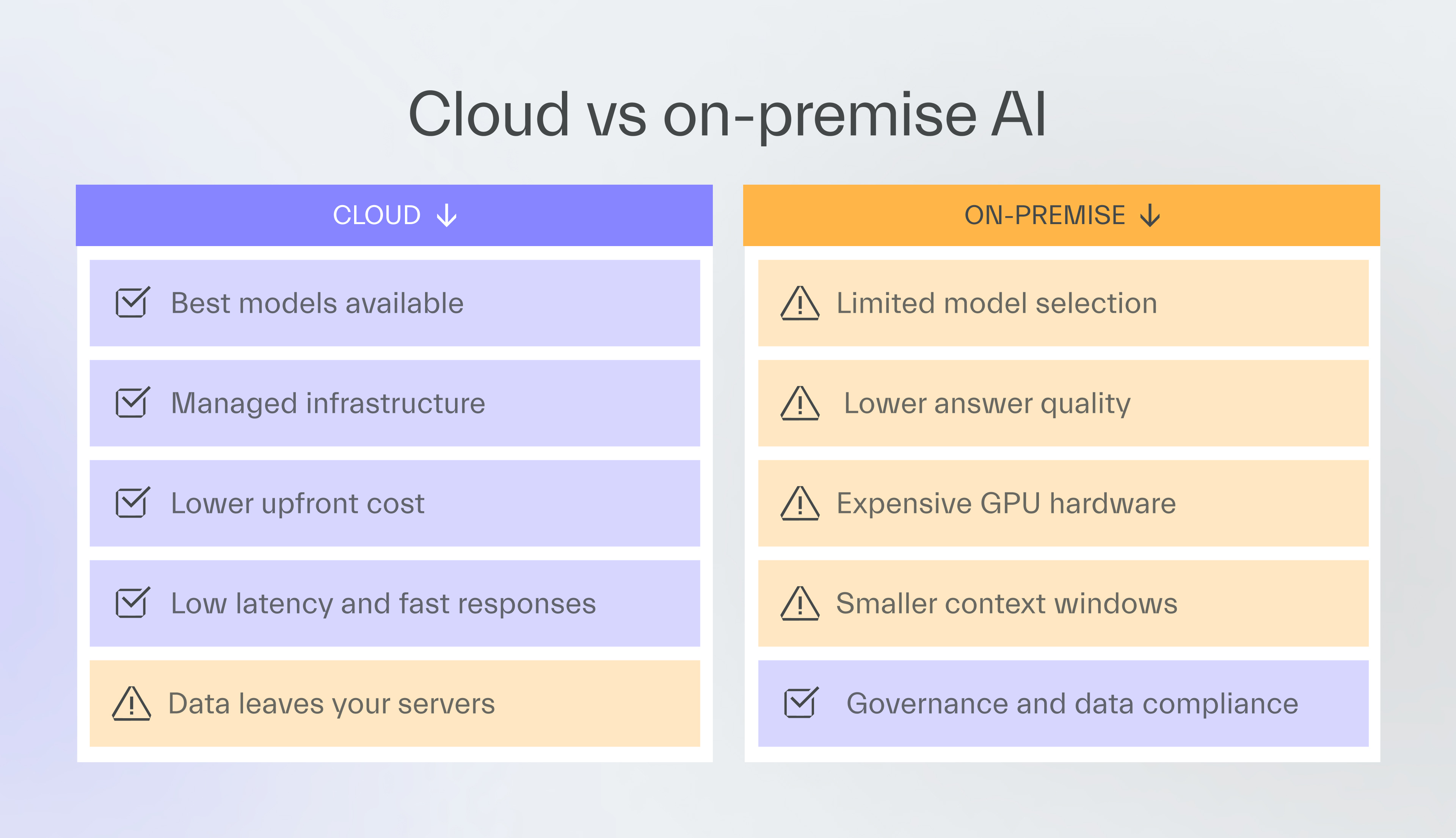
Cloud providers make AI implementation easier by handling model deployment, maintenance, and low-latency responses.
Your IT team then focuses on business logic rather than infrastructure management.
Go for the cloud if there are no good reasons not to.
9. On-premise trade-offs are acceptable
Some regulations or company policies force data to stay on-premises.
The best AI models from OpenAI, Anthropic, or Google aren’t available as open source.
Open-source alternatives have smaller context windows, more hallucinations, and lower-quality answers.
One client had strict data-residency policies, which forced them to use on-premises infrastructure for AI.
When tasked with extracting data from financial documents, the smaller on-prem models produced lower-quality results than expected.
The project was abandoned after the proof-of-concept.
If you have to use on-prem infrastructure, target simple tasks that smaller LLMs can handle.
Governance
10. Documented AI usage rules exist
Employees often use AI tools like ChatGPT without the company’s guidance.
They send sensitive customer data, proprietary code, or confidential business information to external AI providers.
You should have a rulebook that covers:
What AI can be used for,
What data can be sent,
Which company subjects (e.g., internal projects, expertise, or secrets) are off-limits for any AI-based initiative.
11. The AI initiative is backed by legal
Some data requires anonymization before sending to AI, while other data may be entirely prohibited from leaving your systems.
Talk to your law department at the earliest stage of the AI initiative.
They can easily block any initiative, so getting their approval early prevents wasted development time.
A client discovered mid-project that their legal team would not approve the release.
The AI feature violated data processing contracts with customers
Six months of development were wasted.
Metrics
12. Baseline KPIs exist for comparison
Having data on how fast processes run makes it easy to prove if AI implementation was successful in speeding them up.
You might find that document processing improved by 50% while another area showed only a 10% improvement.
If you don’t have such KPIs, check if you can add them before you go through with your AI plan.
Interpreting the results
Don’t look only at how many times you thought “yes”.
You can score perfectly on business items but have no usable data.
If you have no organized processes or data, and your law department knows nothing about AI, stop your initiative and prepare your business first.
If processes are mostly organized and you have usable data, start a small AI pilot.
If none of the issues raised in the checklist stop you, you may be ready for a major AI initiative.
But you probably know that already.
Next time
I will explain how to approach AI product development based on your readiness level.
Thanks for reading today 👋

Have you read this record-breaking issue?




