

Our AI framework estimates 1/3 of any project
It does scope, but needs help with time & cost.

This is “Effective Delivery” — a newsletter from The Software House about improving software delivery through smarter IT team organization.
It was created by our senior technologists who’ve seen how strategic team management raises delivery performance by 20-40%.

TL;DR
AI maps scope and risks faster than any human analyst,
I ran the same pricing prompt 10 times and got 10 different numbers,
Human judgment fills what AI cannot know about your team,
Copilot Collections’ Business Analyst agent is the right tool to start with.
Contents
1. What AI does well in project estimation
2. Where AI estimation breaks down
3. How to start using AI for project estimation
Hey! Jakub here.
I’m a Delivery Consultant advising COOs, CTOs, and CSOs on project executions.
Can AI estimate a software project?
Most IT managers I talk to fall into 1 of 2 camps.
Some assume AI will be unreliable and avoid it entirely.
Others assume AI will handle estimation end-to-end and are surprised when it doesn’t.
Both camps are wrong, and the cost shows up in missed deadlines and blown budgets.
AI is good at some parts of estimation and bad at others.
Know which estimation tasks AI handles well and which still need a human, and you get faster estimates, fewer surprises, and numbers you can trust.
What AI does well in project estimation
When a client sends a brief or a few dozen pages of documentation, a BA agent can process all of it and map out the full picture in minutes.
As a human, I read and partially retain.
AI reads, structures, and surfaces things I would have missed.
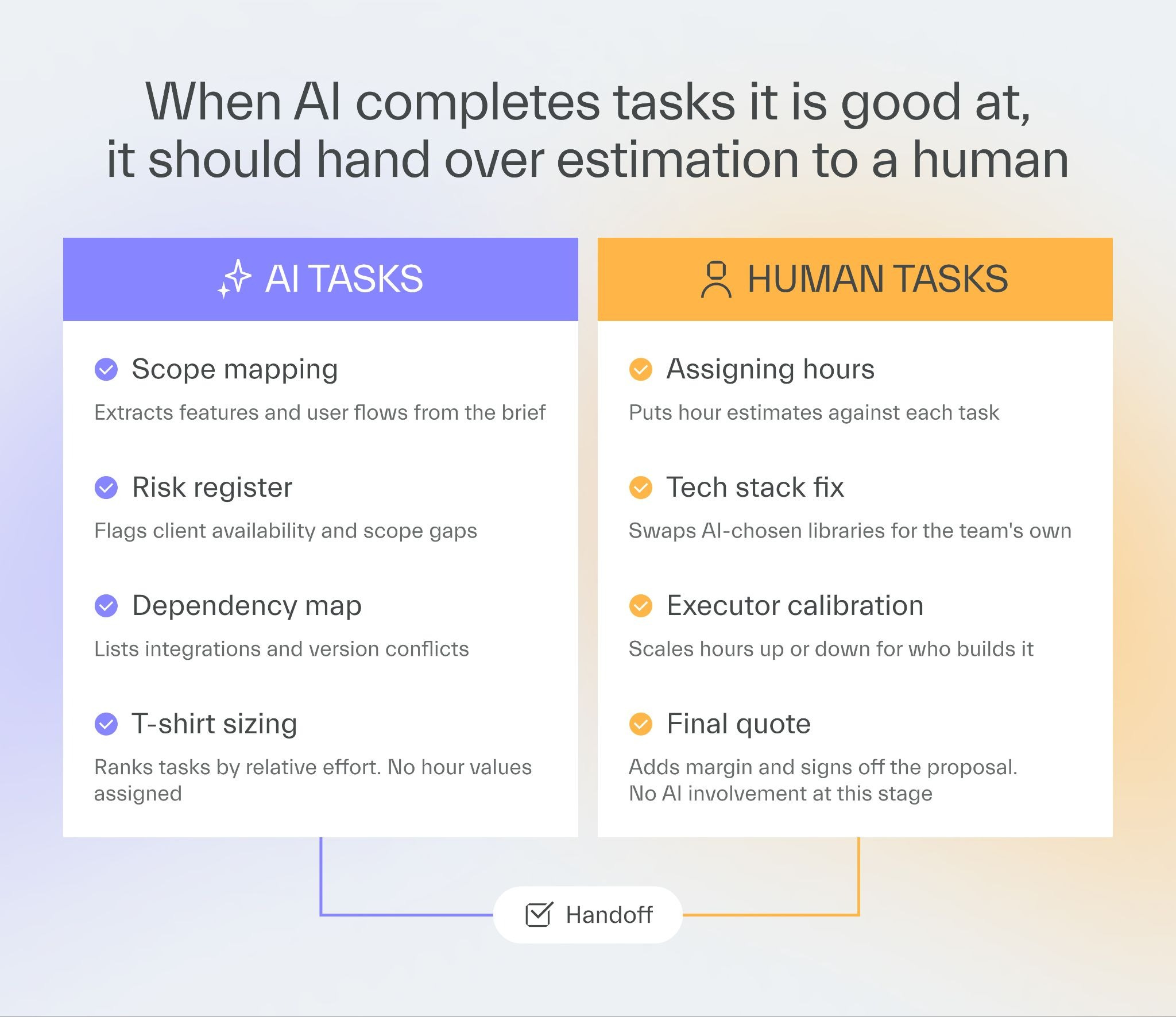
Scope mapping
The agent extracts user flows, functional requirements, and hidden dependencies from even the most unstructured brief.
Risk registers
Feed it a brief, and it produces a structured list of assumptions and risk factors that would take a senior engineer an hour to pull together manually.
T-shirt sizing
AI ranks tasks from simplest to most complex and gives you a rough breakdown across the scope.
One detail that still surprises me is that the BA agent regularly flags client availability as a project risk.
It also flags human risks, such as a key stakeholder going on holiday for three weeks and quietly derailing a delivery timeline.
The structured scope and risk register become the input your team uses to produce the actual estimate.
Where AI estimation breaks down
The moment you ask for an actual number (how many hours, how much it will cost), things get unreliable.
I ran the same pricing prompt against the same project scope 10 times.
I got 10 different results.
LLMs predict the next token based on patterns, not on your company’s delivery history, your team’s skill profile, or which developers will be assigned to the project.
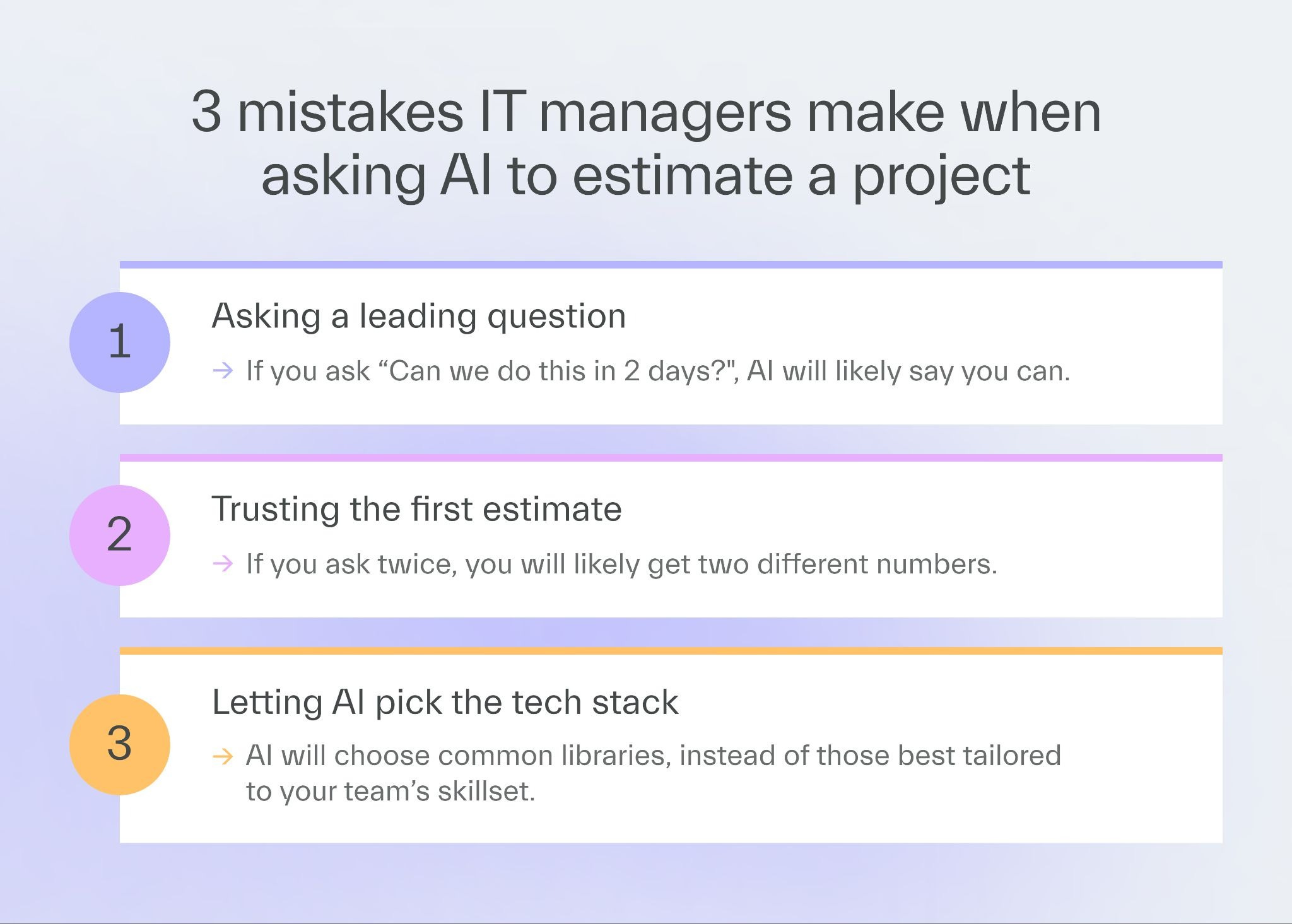
There are 3 failure modes worth watching for.
Inconsistent pricing
Even with detailed input, AI produces different hour estimates every time you run it.
Bad technology choices
Left unchecked, AI defaults to whatever stack is most common in its training data, which may be one your team has never worked with.
Confirmation bias
Frame a prompt around a deadline, and AI will often tell you what you want to hear.
That last one is how a six-month project gets signed off as a six-week sprint.
I once ran an estimation experiment where I gave AI a detailed input and compared its output to what an architect produced for the same scope.
The AI numbers were off by a wide margin.
More context did not produce a better estimate.
It turned out most of the extra input was noise the model could not use.
How to start using AI for project estimation
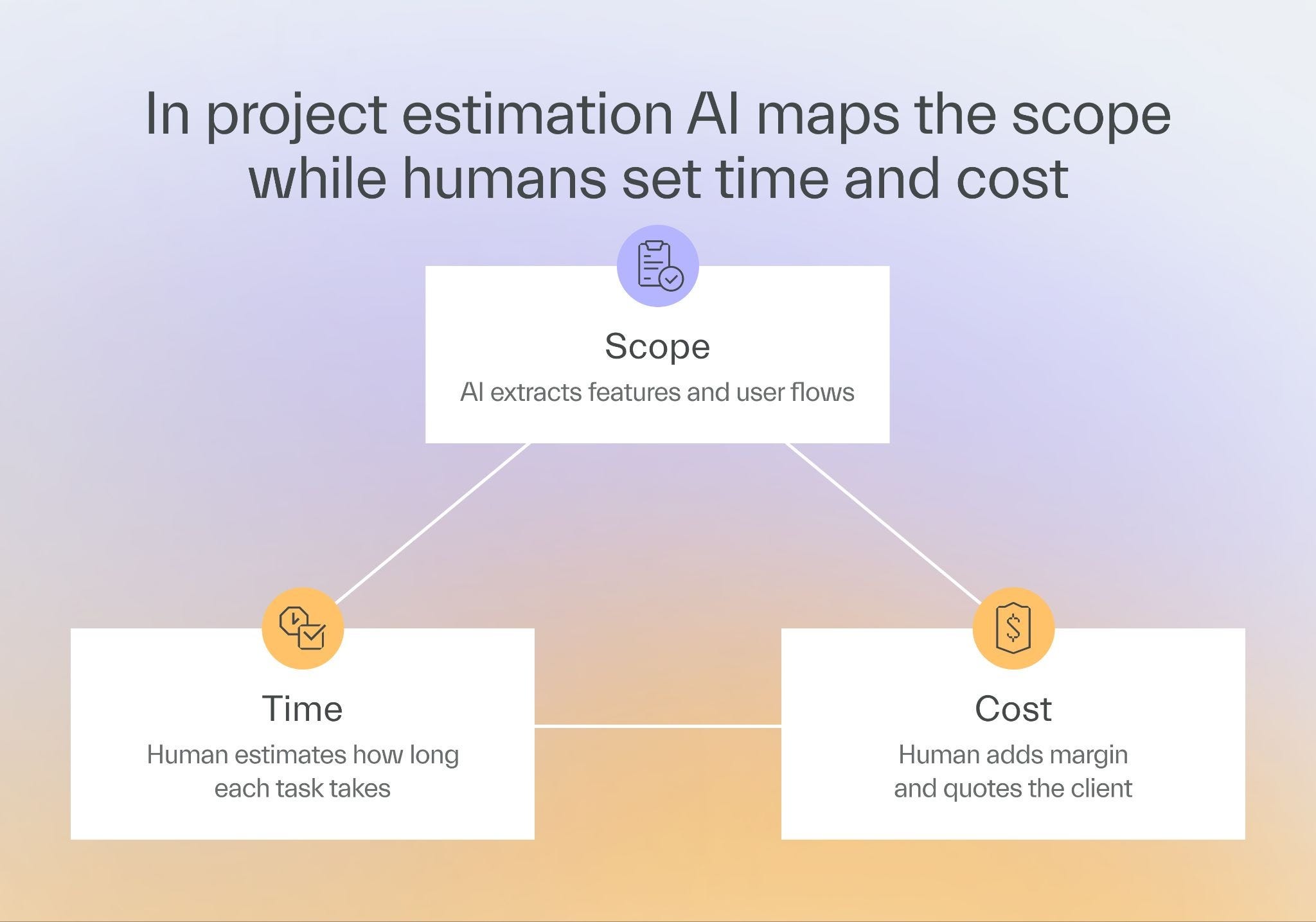
The right AI-driven estimation workflow puts a human in the loop at every stage.
AI prepares the input, a human applies judgment, and makes the final call on numbers.
You can build your own BA agent using any AI framework, or configure one inside a tool your team already uses.
Here, I will show how to do it using Copilot Collections, our AI development framework.
If you have never heard of it before, take 50 seconds to watch this video:
You can get Copilot Collections for free from GitHub.
Step 1: Feed the brief to the BA agent
Gather everything you and the client have put together and run it through the BA agent in Copilot Collections.
Relevant materials include:
project briefs,
workshop notes,
call transcripts,
requirements documents.
The output will include a structured scope, user flows, assumptions, and a risk register.
Do not treat this as final.
Read it, challenge it, and push back where something does not match your understanding.
A fintech client sent us a 40-page specification.
The BA agent processed the full document and surfaced three integration risks the team had missed on first read.
Within the hour, every team member had the same structured view of the scope.
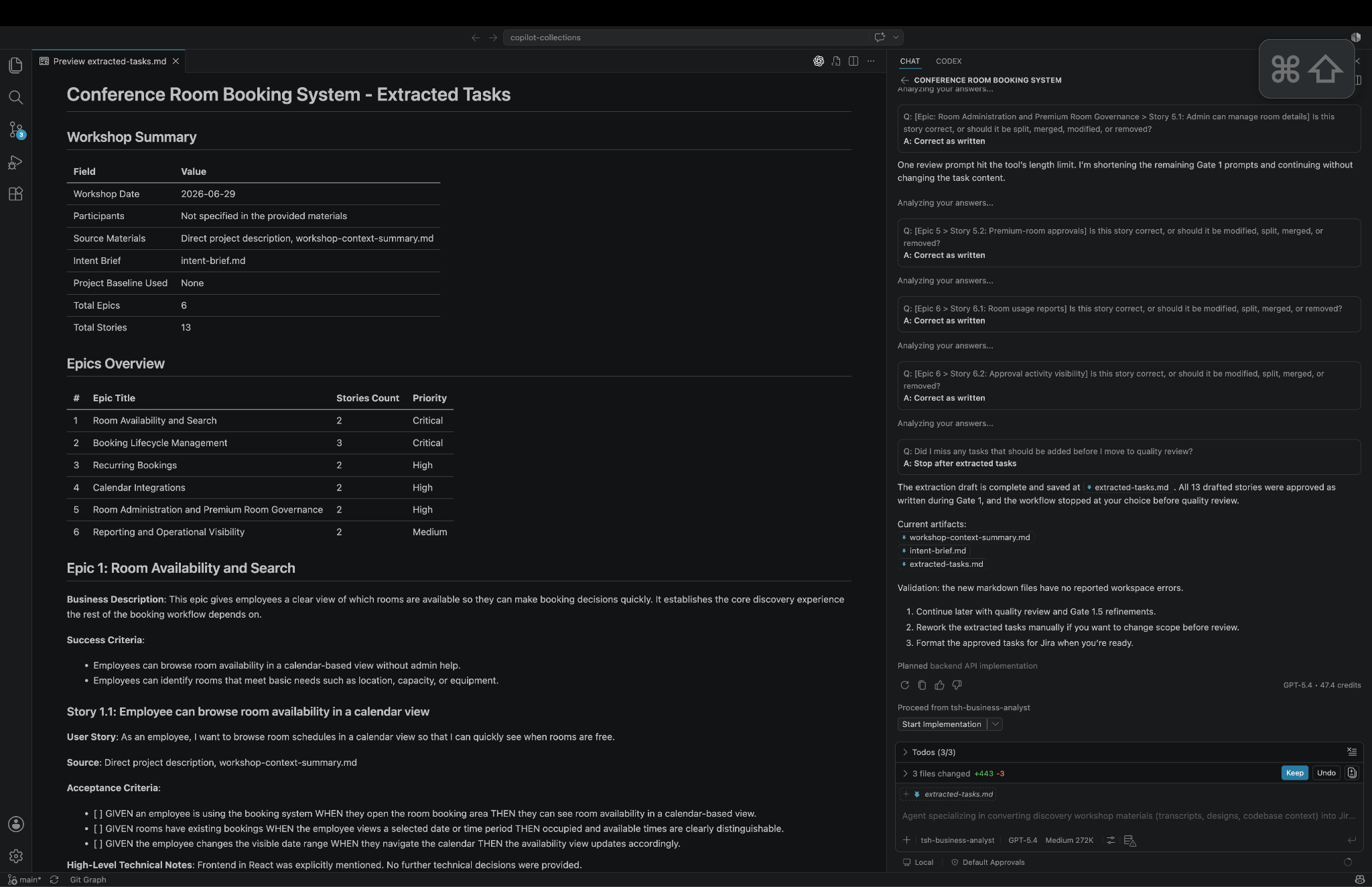
An excerpt from the AI-generated scope, showcasing one story from the Room Availability and Search epic of an example application
Step 2: Validate scope and risks with your team
Share the BA agent output with your estimation team.
Designers check UX complexity, developers flag technical risks, DevOps identifies infrastructure dependencies.
This turns AI output into shared understanding.


Step 3: Lock the tech stack before you prompt
Before you run any estimation prompt, specify the exact tech stack your team will use.
Without that constraint, AI picks whatever is most common in its training data.
On one project, I left the tech stack open.
AI chose a set of technologies with incompatible versions.
The dependency chain it created would have taken more time to untangle than the estimation was worth.
Locking the stack in the prompt fixed it.
Step 4: Apply human judgment for time and price
Take the scope and risk register and hand them to the people who will do the work.
They estimate hours.
You apply your company’s delivery rate, team composition, margin requirements, and any fixed-price buffer.
AI does not know whether your developer uses AI-assisted coding and delivers at 5 times the pace of someone on a client who bans AI tools entirely.
That context lives with you.
Copilot Collections is built on real The Software House commercial projects, so it reflects the tools and approaches we actually use.
That is why I reach for it over a general-purpose chat tool.
Get Copilot Collections from GitHub.
Next time
We will look at how to roll out Copilot Collections across your whole organization.
We will cover rollout for developers and product people alike, and what that shift does to delivery performance.
See you in 2 weeks 👋

More AI — more problems



Help us pay the bill for bitcoin mining

Published with a smirk by The Software House
Twarda 18, Warsaw, Poland
tsh.io →
 | A guest post by
|