

The age of multi-agent AI engineering
A 1000% productivity boost is now real.

This is “Effective Delivery” — a bi-weekly newsletter from The Software House about improving software delivery through smarter IT team organization.
It was created by our senior technologists who’ve seen how strategic team management raises delivery performance by 20-40%.
TL;DR
AI productivity gains rarely exceed 40%,
Pro users go beyond the cap by running a team of AI agents,
AI superusers coordinate many such teams at once,
My own developers achieve 1000% productivity this way.
Contents
3. Implementing multi-task agents
Hey! Adam here.
Your IT team may implement best practices in AI development and still achieve only a modest efficiency boost.
Developers who use a single AI agent to handle one task at a time quickly reach a ceiling.
My top engineers use many agents in parallel, raising output by 1000%.
The AI efficiency ceiling
When I talk about an AI productivity boost, I mean how much faster one developer can deliver a feature from start to finish.
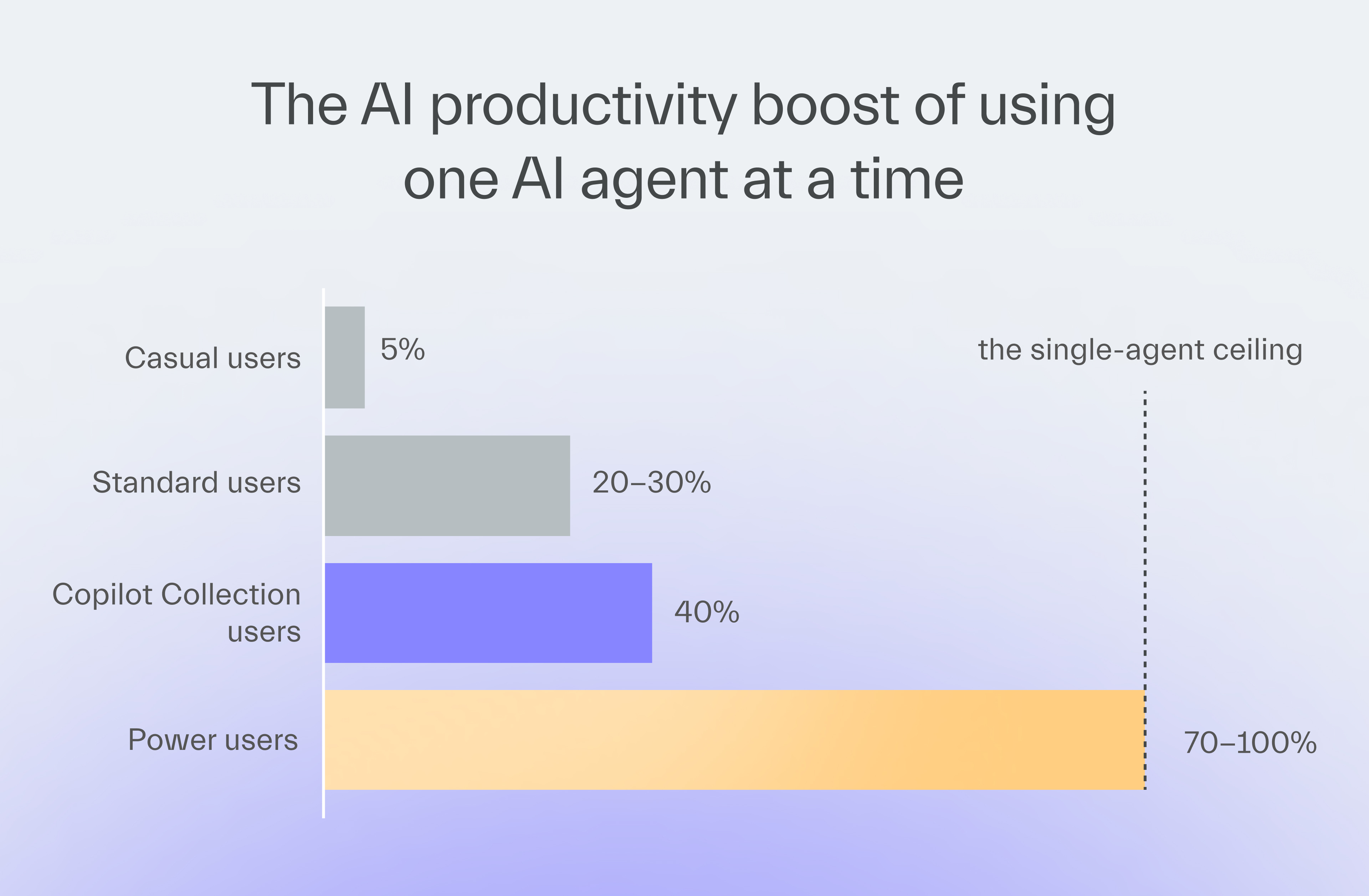
When you introduce AI tools, you may see varying gains:
Some report a boost of only 5%,
Some report 20-30%,
Our AI framework gives a baseline of 40% to all who use it properly,
Some pros improve by 70-100%.
This is where even those heavy-hitters find their limit.
But there’s a world beyond this single-threaded AI use.
3 levels of using AI agents
At TSH, we’ve long had a policy of giving more freedom with AI tools to those who deliver great results.
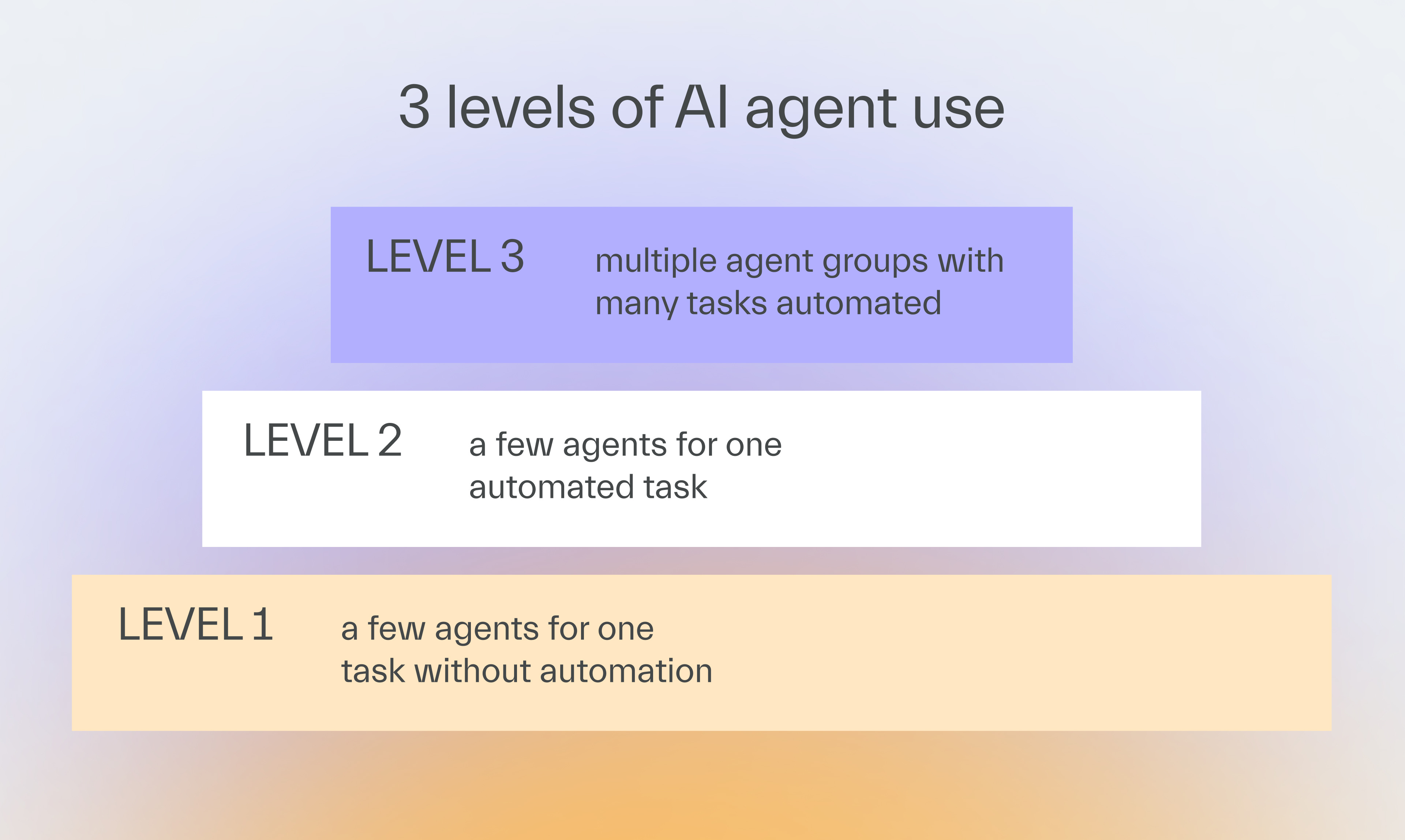
Over time, 3 advanced levels of AI usage emerged:
Level 1
A few agents for one task without automation
A developer uses a few agents, each built for a different task, such as writing tests or generating components.
The developer runs the agents in a specific order.
Level 2
A few agents for one automated task
The developer adds an orchestrating agent on top of the task-specific agents.
The developer gives commands to the orchestrator.
The new agent decides which agents to run and in what sequence.

Unblock Delivery in 2-4 Weeks
My engineers at TSH help organizations fix delivery blockers in 2 sprints max.

Level 3
Multiple agent groups with many tasks automated
The developer runs the coordinating agent and the task-specific agents across multiple tasks at once.
Those separate agent groups work on multiple tasks in parallel.
Level 3 is where the superpower is.
An engineer who can do it becomes a master puppeteer, managing layers of AI agents that do all the work while the human verifies the output.
One of our engineers worked on 3 features at once using agent groups.
This approach multiplied his delivery beyond what any single-threaded user could achieve.
He delivered several times more story points than his peers, who already ranked in the top 30 AI users at our company.
Implementing multi-task agents
As great as it all sounds on paper, keep in mind that there are reasons why multi-task agents aren’t a one-size-fits-all solution.
Account for technical limitations
The developer can’t run many agents in the same codebase, each doing different tasks at once, because that would result in conflicts.
They need to create separate copies of the app state to form a worktree.
Each agent group works on a different branch of the worktree.
Frontend tasks adapt better to this because the backend ones require the developer to duplicate the database for each branch.
Pick the right adopters
Not every developer can become an AI superuser.
Some prefer hands-on coding, while others thrive as specialists and struggle with context switching.
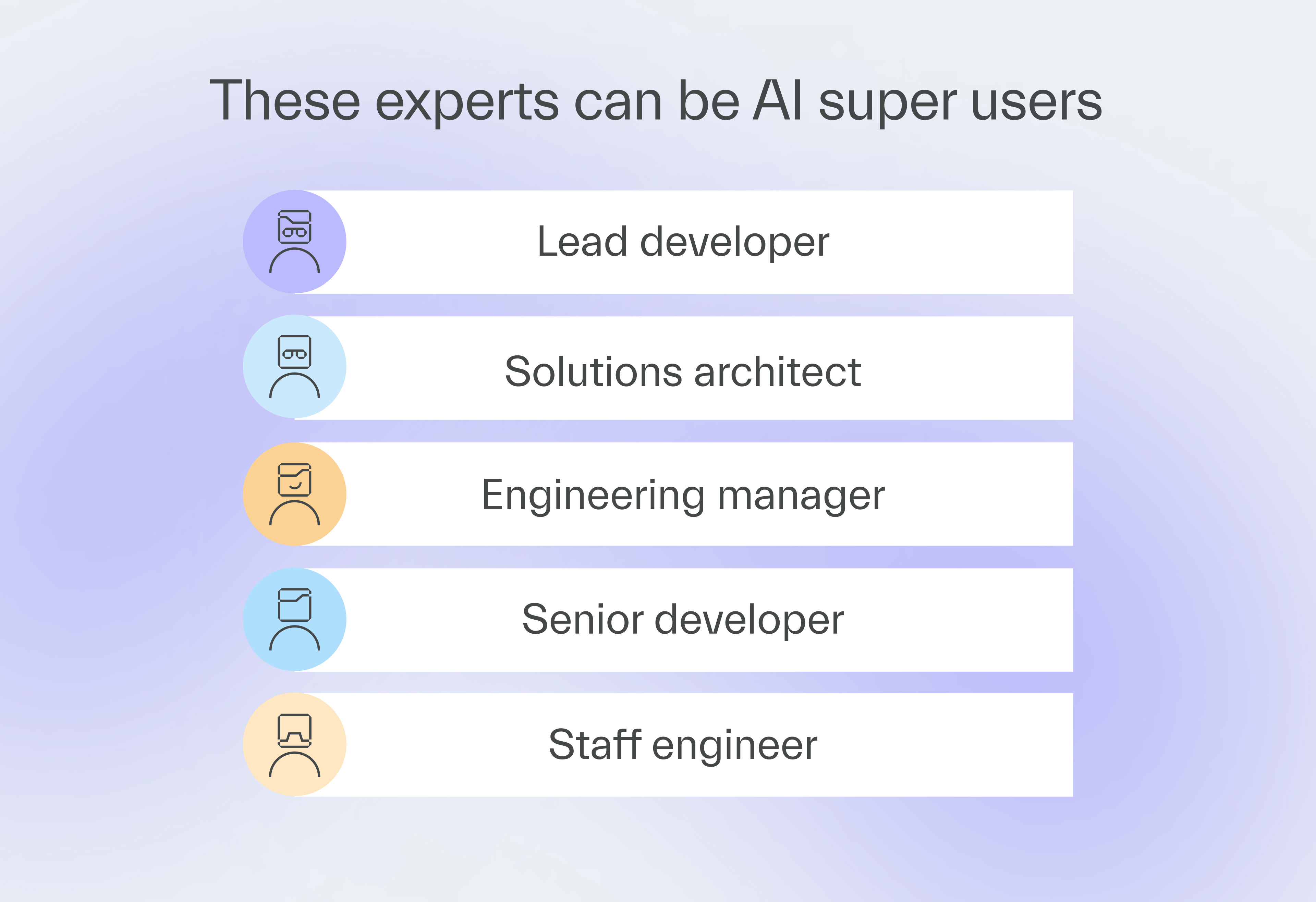
The best candidates have T-shaped experience, combining deep coding expertise with broad knowledge in areas like architecture or DevOps.
Lead developers, solutions architects, IT managers, and staff engineers fit this pattern.
Lead the change
To get started, follow these 3 steps.
1. Locate the best candidates for the multi-agent approach
It requires a developer with the right skills and mindset.
Superusers may also emerge when you give your best developers more freedom.
2. Avoid bottlenecks
Assign less experienced developers to your superusers so that they can learn from them.
That way, your development won’t come to a halt when the superuser is unavailable.
3. Verify the output
Regardless of how fast your AI developer is, the same quality controls should apply.
In our projects, AI may generate 100% of the code, but humans always verify its quality.
Next time
Andrzej Wysoczański will explain the divide between IT managers who focus on business growth and those who create development roadblocks through micro-management.
One side risks getting replaced by AI!

Most subscribers haven’t seen this




Published with a smirk by The Software House
Twarda 18, Warsaw, Poland
tsh.io →
 | A guest post by
|